Diagram#
- class discopy.ribbon.Diagram(inside, dom, cod, _scan=True)[source]#
Bases:
discopy.pivotal.Diagram,discopy.balanced.Diagram,discopy.abc.RibbonCategoryA ribbon diagram is a pivotal diagram and a balanced diagram.
- Parameters:
inside (Layer) – The layers of the diagram.
dom (pivotal.Ty) – The domain of the diagram, i.e. its input.
cod (pivotal.Ty) – The codomain of the diagram, i.e. its output.
- trace(n=1, left=False)[source]#
The trace of a ribbon diagram.
- Parameters:
n – The number of wires to trace.
- cup(x, y)[source]#
Post-compose a ribbon diagram with a cup between wires
iandjby introducing braids.- Parameters:
i – The wire on the left of the cup.
j – The wire on the right of the cup.
- to_ribbons(width=None)[source]#
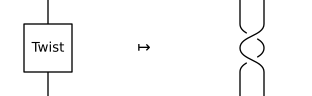
Doubles every object and sends the twist to the braid, folding cups and caps into a single box.
- Parameters:
width (float) – The width of a ribbon, i.e. the gap between the two wires encoding each object, defaults to the
ribbon_widthindiscopy.config.DRAWING_DEFAULT. Set to0to return the diagram as is, i.e. without doubling it into dual rails.
Example
>>> x = Ty('x')
>>> braided_twist = Diagram.twist(x).to_ribbons()
- dual_rail_factory#
alias of
DualRail
- twist_factory#
alias of
Twist